TL;DR
The Short Answer
To build an AI agent in n8n:
- Get an n8n instance: start an n8n Cloud trial (14 days, no install) or self-host the free Community edition with Docker.
- Create a workflow and add a Chat Trigger node.
- Add an AI Agent node after it. It decides which tools to call and when.
- Connect a chat model sub-node (OpenAI Chat Model, Anthropic Chat Model, and others) with your API key. On n8n Cloud you can use Gateway credits instead of your own key.
- Connect Simple Memory so the agent remembers the conversation.
- Connect at least one tool (the node requires one): an app node like Google Calendar, an HTTP Request tool, or a Call n8n Workflow Tool.
- Write a system message and clear tool descriptions, open the chat, and test.
- Publish the workflow and turn on Make Chat Publicly Available when you want others to use it.
No code needed. It's all nodes and text fields, plus an occasional expression like {{ $fromAI('email') }}.
Cost reality: every chat message runs the workflow once, so a 10-message conversation uses 10 executions, plus model tokens.
n8n Quickstart (QS101)
Visit ↗n8n Academy · Free · free certificate · Beginner · 3-5 hours
The best free way to learn this properly: n8n's official course ends with a working AI agent (AI Agent node, memory, tools) and gives you a free certificate.
In Practice: AI, Testing & Best Practices (N8N103)
Visit ↗n8n Academy · Free · free certificate · Intermediate · 3-4 hours
Take it once your agent does real work. It covers chains vs agents, then testing, error handling and production readiness.
What an n8n AI Agent Is (and How the Loop Works)
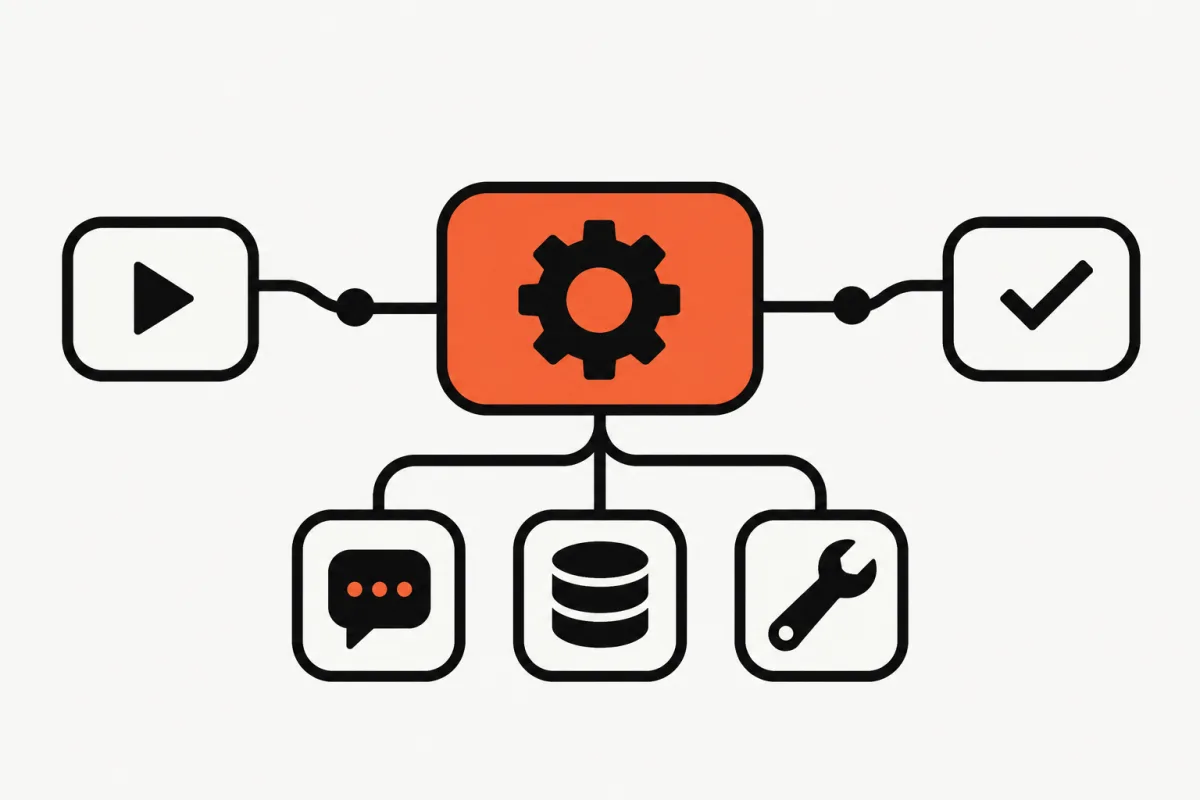
An n8n AI agent is a workflow built around the AI Agent node. You give it a goal (the user's message), a model, and a set of tools. The model reads the request, decides whether it needs a tool, calls it, reads the result, and repeats until it can answer. That repeat-until-done cycle is the agent loop.
The AI Agent node is a cluster node: a root node with sub-nodes plugged in underneath. It has four slots:
- Chat Model (required): the LLM. n8n supports OpenAI, Anthropic, Google Gemini, Mistral, Groq, Ollama and more.
- Memory (optional): stores recent messages per session. Simple Memory keeps them inside n8n; Postgres, Redis and MongoDB chat memory nodes persist them in a database.
- Tool (at least one required): any action the model may take. Most app nodes (Gmail, Google Sheets, Slack, Notion, Postgres) work as tools, plus tool nodes like HTTP Request, Call n8n Workflow Tool and MCP Client Tool.
- Output Parser (optional): turn on Require Specific Output Format to force structured output.
One loop, step by step. A user asks "Am I free Thursday at 3pm? If so, book a call with Dana." The model gets the message, system message and tool list, and replies with a tool call (Google Calendar: get Thursday's events). n8n runs it and returns the result. The model then calls create event, gets the confirmation, and writes the answer. Max Iterations (default 10) caps how many rounds this can take before the agent stops.
Agent vs plain LLM chain. n8n also has a Basic LLM Chain node. A chain is one model call: no tools, no memory. Use it for fixed steps like "summarize this email." Use an agent only when the model has to decide what to do next. Chains are cheaper and more predictable.
Since n8n 1.82.0 every AI Agent node works as a Tools Agent. Tutorials that have you pick "Conversational Agent" or "ReAct Agent" are out of date.
| What it does | In our example agent | |
|---|---|---|
| Chat Trigger | Starts the workflow on every chat message and gives you a chat UI | Hosted chat for your team |
| AI Agent (root node) | Runs the loop: reads the message, picks tools, writes the answer | System message with rules and tool guidance |
| Chat model (sub-node) | The LLM that does the reasoning | OpenAI Chat Model or Anthropic Chat Model |
| Memory (sub-node) | Keeps recent messages so follow-ups make sense | Simple Memory, last 10 interactions |
| Tools (sub-nodes) | Actions the model can choose to call | Google Calendar, HTTP Request, Call n8n Workflow |
| Output parser (optional) | Forces a fixed output format such as JSON | Not needed for a chat agent |
n8n Cloud vs Self-Hosted: Which to Use
n8n Cloud is the fastest start. A new trial gives you 14 days of Pro features with 1,000 executions, no credit card required. After that, the pricing page lists (in euros where we checked; your region may show another currency):
- Starter: €20/month billed annually (€24 monthly) for 2,500 workflow executions, 5 concurrent executions, and 1,600 Assistant credits a month.
- Pro: €50/month billed annually (€60 monthly) for 10,000 executions, with higher tiers above that.
- Business (self-hosted only) and Enterprise cost more and add SSO, environments and Git version control.
All plans include unlimited workflows and users, and "Agents, MCP and AI nodes" are included from Starter. n8n bills per execution (one full run of a workflow, however many steps it has), not per step.
Self-hosted Community edition is free with almost the full feature set, but n8n recommends self-hosting only if you're comfortable managing servers, security and updates. Public chats, webhooks and OAuth logins also need a publicly reachable URL.
The quickest setup in the current docs is the one-line installer (Docker Compose v2, plus the sandbox services n8n Assistant needs). Plain docker run still works. Skip npx n8n for anything lasting: npm installs are deprecated from n8n 3.0 and don't get n8n Assistant. Then open http://localhost:5678.
# Recommended: one-line setup (needs Docker with the compose v2 plugin)
curl -fsSL https://get.n8n.io | sh

# Alternative: plain Docker
docker volume create n8n_data
docker run -it --rm \
  --name n8n \
  -p 5678:5678 \
  -e GENERIC_TIMEZONE="Europe/Berlin" \
  -e TZ="Europe/Berlin" \
  -e N8N_ENFORCE_SETTINGS_FILE_PERMISSIONS=true \
  -v n8n_data:/home/node/.n8n \
  n8nio/n8n
Step 1: Add the Chat Trigger, AI Agent and Model
We'll build a team assistant: a chat agent that checks your calendar, looks up customers in a Google Sheet, and files support tickets through an API. One tool takes a real action, so you'll add a safety check too.
- Create a new workflow. Add the Chat Trigger node (search "chat"). Leave Make Chat Publicly Available off while you build; you'll test from the editor's chat panel.
- Click + after the trigger and add the AI Agent node. Leave Prompt on Take from previous node automatically: it reads the
chatInputfield the Chat Trigger sends. - In the Chat Model slot, add OpenAI Chat Model or Anthropic Chat Model with your API key, or on n8n Cloud select Use Gateway credits. A current mid-size model is usually enough for tool routing.
- Click the Memory slot and add Simple Memory. Set Context Window Length to about
10interactions. Keep the default session key, which the Chat Trigger provides per conversation.
Warning from the docs: Simple Memory doesn't work in queue mode. Self-hosting at scale? Use Postgres or Redis Chat Memory.
Step 2: Write the System Message
Open the AI Agent node, go to Options, add System Message, switch the field to Expression, and paste something like this. It tells the agent its job, which tool to use for what, and what it must never do on its own. The {{ $now }} expression gives the model today's date, which it otherwise doesn't know.
Three rules that matter more than clever wording:
- Name every tool and say when to use it. The model picks tools by name and description, so the system message and the tool descriptions should agree.
- Say what to do when a tool fails or returns nothing. Otherwise the model will guess, and guesses sound confident.
- Keep it short. The system message is sent on every loop iteration, so a long one costs tokens on every step.
You are the team assistant for Acme Support. Today is {{ $now.toFormat('cccc, d LLLL yyyy') }}.

Your job: answer questions about schedules and customers, and file support tickets.

Tools:
- check_calendar: use for any question about availability or meetings.
- lookup_customer: use before filing a ticket, to get the customer's plan and account ID.
- create_ticket: use only after you have the customer's account ID and a clear summary of the problem.

Rules:
- Never invent meetings, customers, or account IDs. If a tool returns nothing, say so.
- Before calling create_ticket, repeat the summary and priority back to the user.
- If a request is outside these tools, say you can't do it yet.
- Answer in 3 sentences or fewer unless the user asks for detail.
Step 3: Connect the Tools (with Exact Descriptions)
Add three tools through the Tool slot. Write each description for the model, not for yourself.
Tool 1: Google Calendar (check_calendar). Add the Google Calendar node as a tool, connect your Google account, and choose the operation that gets many events. On the time range fields, click "Let the model define this parameter" so the agent fills them in. Description:
Get events from the team calendar between two dates. Use this to check availability or list meetings. Input: start and end date-times in ISO 8601.
Tool 2: Call n8n Workflow Tool (lookup_customer). Build a second workflow that is triggered by another workflow, reads your customers sheet with Google Sheets, and returns the matching row. In the main workflow, add Call n8n Workflow Tool, pick it under Source: Database, and let the model fill the email input. Description:
Look up a customer by email address. Returns name, plan, and account ID, or nothing if the customer doesn't exist.
Sub-workflows are the most underrated trick here: the agent sees one simple tool, while the sub-workflow runs ten deterministic steps behind it. Gotcha: in production the sub-workflow must be published, or the call fails with "Workflow is not active and cannot be executed", an error that's easy to miss in the agent's reply.
Tool 3: HTTP Request (create_ticket). Use the HTTP Request tool for any API without its own node. Method POST, URL your helpdesk's ticket endpoint (or a webhook.site test URL while you build), API key in a credential, and a JSON body in Expression mode. Each $fromAI() marks a value the model supplies (key, description, type). Description:
Create a support ticket. Only call this after lookup_customer has returned an account ID and the user confirmed the summary.
Gate the risky tool. In the AI Agent's Tools panel, add a Human review step (approval via n8n chat, Slack, Telegram and others) and connect create_ticket to it. The workflow pauses until someone approves or denies, and a denial is reported back to the agent.
{
  "account_id": "{{ $fromAI('account_id', 'Account ID returned by lookup_customer', 'string') }}",
  "summary": "{{ $fromAI('summary', 'One-sentence summary of the problem', 'string') }}",
  "priority": "{{ $fromAI('priority', 'low, normal or high', 'string') }}",
  "source": "n8n-agent"
}
Step 4: Test, Debug and Publish
Open the chat panel at the bottom of the canvas and try prompts that should hit each tool:
- "What's on the calendar next Tuesday?" (check_calendar)
- "Find the customer dana@example.com." (lookup_customer)
- "Dana's exports have been failing since Monday, file a high-priority ticket." (lookup_customer, then create_ticket after confirmation and approval)
- "What did I just ask you to do?" (memory)
After each run, open the execution logs to see which tool it called, with what input, and what came back. Most bugs are a vague tool description (wrong tool picked), a badly filled parameter (tighten the $fromAI() description), or a tool that failed quietly (check the sub-workflow's executions).
When it works, publish the workflow. To share it, turn on Make Chat Publicly Available in the Chat Trigger, choose Hosted Chat (n8n's chat page) or Embedded Chat (your own UI or n8n's chat widget), and set authentication: none, basic auth, or n8n user login. For anything internal, don't leave it on none.
MCP in n8n: Use MCP Servers, or Become One
n8n supports the Model Context Protocol in both directions:
- MCP Client Tool (a tool sub-node): plug any MCP server into your AI Agent. Set the endpoint URL and authentication (bearer, header, or OAuth2), then choose Tools to Include: all, selected, or all except. For popular services like Notion or Linear, the tools panel has an MCP servers registry: pick one, sign in, and n8n creates the credential. A plain MCP Client node also calls one MCP tool as a normal workflow step.
- MCP Server Trigger (a trigger node): turn a workflow into an MCP server. Attach tool nodes or Call n8n Workflow Tools to it, and n8n exposes them at a test URL and a production URL (live once you publish). It supports SSE and streamable HTTP, not stdio.
- Instance-level MCP: n8n also has a built-in MCP server for the whole instance, so Claude, ChatGPT or a coding agent can search, build, edit and run your workflows.
n8n's own advice: an app node as a tool gives tighter control (you fix the operation and pin parameters); an MCP server gives many actions from one connection, at the cost of control and more context per call. For a first agent, prefer app nodes.
To use an MCP Server Trigger from Claude Desktop, which speaks stdio, the n8n docs use the mcp-remote bridge. Replace the URL and token with values from your trigger node. Want to build an MCP server in code instead? See our Python MCP server tutorial.
{
  "mcpServers": {
    "n8n": {
      "command": "npx",
      "args": [
        "mcp-remote",
        "<MCP_URL>",
        "--header",
        "Authorization: Bearer ${AUTH_TOKEN}"
      ],
      "env": {
        "AUTH_TOKEN": "<MCP_BEARER_TOKEN>"
      }
    }
  }
}
The n8n AI Agent Builder and n8n Assistant
"n8n AI agent builder" can mean two newer features. Neither replaces understanding the nodes above.
Agent Builder (Preview). A separate place in n8n to build agents without a canvas. You give an agent a model, instructions, and capabilities: tools (n8n integrations, your workflows, custom tools, MCP servers), web search, skills, a knowledge base (csv, pdf, markdown, txt), memory, and sub-agents. Agents can run on a schedule, connect to Slack, Telegram, Linear and Microsoft Teams, and require approval before sensitive tools run. It's on all n8n Cloud plans and on self-hosted n8n from 2.32.3. Each agent turn counts as one execution, from the same quota as your workflows. Workflows can call these agents with the Message an Agent node.
n8n Assistant (Preview). A chat-based builder: describe what you want, and it plans the workflow, builds it, tests it, and helps fix errors. It can also draft agents (instructions, tools and skills). The result is a normal workflow you can open and edit. It's on Cloud Starter and Pro (1,600 Assistant credits a month on Starter, 4,000 or 9,600 on Pro depending on tier; Enterprise on request), and on self-hosted Community, Registered Community and Business editions with your own model API key. Older tutorials call the prompt-to-workflow feature AI Workflow Builder; the current docs and pricing page call it n8n Assistant.
Our take: let the Assistant draft version one, then read every node it created. You'll debug much faster.
n8n AI Agent Examples Worth Building
Four agents that are genuinely useful and small enough to finish in an afternoon:
- Inbox triage agent. Trigger: new Gmail message. The agent classifies it, drafts a reply with the Gmail tool (as a draft, not sent), and posts urgent ones to Slack. Use a Text Classifier node for the sorting and the agent only for drafting.
- Meeting scheduler in Telegram. Telegram Trigger, AI Agent, Google Calendar tools (get events, create event), Simple Memory. You text "find 30 minutes with Sam next week" and it proposes slots. Put Human review on event creation.
- Docs Q&A agent. Load your help docs into a vector store (Simple, Pinecone, Qdrant, Supabase and others), attach it as a Vector Store Question Answer Tool, and serve it through the Chat Trigger's hosted chat. Tell it to say "I don't know" when retrieval comes back empty.
- Lead research agent. Trigger: new row in a Google Sheet. The agent uses an HTTP Request tool to fetch the company website or a search API, writes a three-line summary and a fit score back to the sheet. Add an output parser so the score is always a number.
Before starting from scratch, search n8n's template library for AI Agent workflows to import and adapt.
Limits, Costs, and When to Switch to Code
What it costs. Two bills: n8n executions (each chat message or trigger run counts once, however many tool calls happen inside) and model tokens (each loop iteration resends the system message, memory and tool results). 2,000 messages a month fits Starter's 2,500 executions; a busy team chat won't. Concurrency is capped too (5 on Starter), so heavy traffic queues.
Limits you'll hit:
- Execution time. Cloud caps a single execution at 5 minutes on Starter and 40 minutes on Pro. Long research loops can hit that.
- Testing. Agents are non-deterministic, so "it worked once" isn't a test. n8n has evaluations (light evaluations on every Cloud plan; metric-based ones on one workflow on Starter, unlimited on Pro), but you build the test set yourself.
- Version control and review. Workflows are JSON. Git-based version control and environments need Business or Enterprise.
- Complex logic. Multi-agent branching, custom retries and typed data contracts get awkward on a canvas.
When to move to code. Stay in n8n while your agent is mostly glue: one model, a handful of tools, and lots of integrations n8n already has. Move to a code framework when you need unit tests in CI, typed structured outputs you can rely on, multi-agent orchestration, or an agent embedded in your own product. Our AI agent frameworks comparison covers the options, and our free PydanticAI course teaches you to build the same kind of tool-using agent in Python, step by step. Many teams use both: n8n for integrations, a coded agent behind an HTTP endpoint for the hard part.
Next Steps
- Build the agent above with one tool first (Google Calendar), then add the other two one at a time.
- Take n8n's free Quickstart for a guided version with a certificate, then N8N103 In Practice for testing and error handling.
- Read the docs that matter most: the AI Agent node, Tools Agent options, and Human-in-the-loop for tools.
- Compare learning paths in our best vibe coding courses guide if you also want to build apps, not just automations.
- Ready for code? Start the free PydanticAI course.
FAQ
- Is n8n free for building AI agents?
- The self-hosted Community edition is free and includes the AI Agent node, memory, tools and MCP nodes. n8n Cloud has a 14-day trial, then paid plans starting at €20/month billed annually (€24 monthly) for 2,500 executions. Either way you pay your model provider for tokens, unless you use n8n Cloud's Gateway credits, which are billed from a prepaid balance.
- Which AI models work with the n8n AI Agent node?
- Any chat model n8n has a sub-node for, including OpenAI, Anthropic (Claude), Google Gemini, Mistral, Groq, Azure-hosted models and Ollama for local models. Pick a model that is good at tool calling; small local models often choose tools poorly.
- n8n vs Zapier or Make for AI agents: which is better?
- n8n is the stronger pick if you want control: you can self-host for free, see every tool call, use sub-workflows as tools, connect MCP servers, and pay per workflow execution rather than per step, which matters because agents take many steps. Zapier and Make are easier to start with and have their own agent features, but you give up self-hosting and step-level control.
- Can n8n use MCP?
- Yes, both ways. The MCP Client Tool connects an AI Agent to any MCP server (or pick one from the built-in registry), and the MCP Server Trigger turns a workflow into an MCP server that Claude, Cursor or other clients can call. There is also an instance-level MCP server that lets AI tools build and run your workflows.
- Do I need to code to build an n8n AI agent?
- No. The agent, model, memory and tools are all configured in forms. You'll occasionally write a short expression, like {{ $now }} for the date or $fromAI() to control a tool parameter, but no programming. Coding helps once you need custom logic, tests or an agent inside your own app.
- What do I need to self-host n8n?
- Docker (with the compose v2 plugin for the one-line installer), a machine that stays on, and comfort with basic server security and updates. SQLite is the default database; use Postgres for production. For a public chat, webhooks or OAuth logins like Google, the instance also needs a public HTTPS URL. npm installs still work today but are deprecated from n8n 3.0.